The Enterprise AI Copilot
for ArcGIS Pro & QGIS
AntigravityGIS by Sounny brings natural-language spatial intelligence directly into your ArcGIS Pro Geoprocessing pane and QGIS interface. Inspect dataset schemas, audit spatial references, execute ArcPy/PyQGIS tools, and automate GIS workflows, running off your active Google Antigravity Account.
Experience the Interactive ArcGIS Pro AI Copilot
A sleek, multi-turn AI assistant alongside your map view with live geodatabase synchronization and ArcPy code execution.
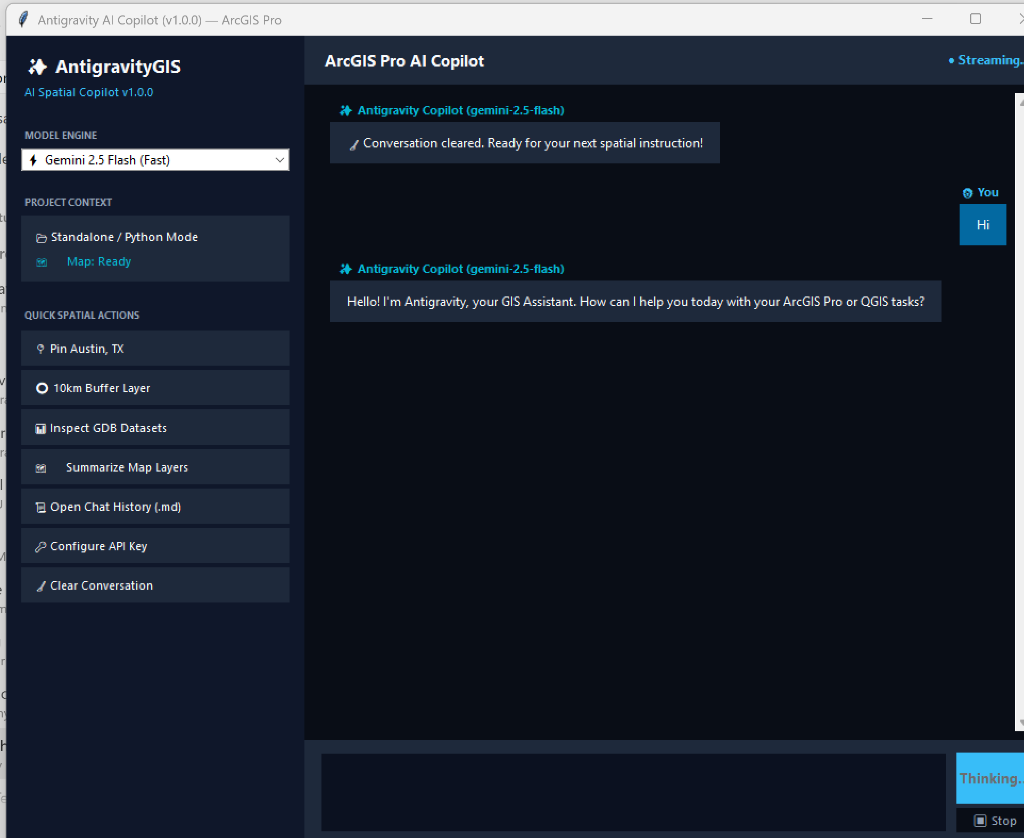
Multi-Turn Conversational Memory
Maintains spatial context across your workflow. Ask to pin a city, buffer it by 10km, and inspect intersecting parcels seamlessly.
1-Click ArcPy Code Runner
Generated ArcPy snippets include interactive ▶ Run in ArcPy execution directly against your active ArcGIS Pro map canvas.
Automatic Geodatabase Audit Trail
Every session turn is automatically logged to Antigravity_Chat_History.md and native ArcGIS GDB table Antigravity_Session_Log.
Dual Model Engine
Switch dynamically between Gemini 2.5 Flash (sub-second response) and Gemini 2.5 Pro (deep spatial reasoning).
Choose Your Desktop GIS Platform
1-Click Terminal Setup for Windows Devices.
Esri ArcGIS Pro
ArcPy Geoprocessing Pane AI Copilot extension. Automated Python environment setup & toolbox deployment for Windows.
irm https://raw.githubusercontent.com/sounny/antigravitygis/main/install-arcgis.ps1 | iex
QGIS Desktop (PyQGIS)
Native PyQGIS Plugin & Python SDK harness. Automatic dependency configuration and plugin folder deployment for Windows.
irm https://raw.githubusercontent.com/sounny/antigravitygis/main/install-qgis.ps1 | iex
ArcGIS Pro AI Copilot Integration
Clean ArcPy agent execution directly in your Geoprocessing pane.
# ArcGIS Pro AI Copilot Execution in Geoprocessing Pane
import arcpy
from agent_core import GISAntigravityAgent

# Initialize AntigravityGIS Agent on your active Google Antigravity account
agent = GISAntigravityAgent()

# Natural Language Instruction in ArcGIS Pro
prompt = "Inspect feature classes in target.gdb and buffer streams by 50 meters."
response = await agent.execute_prompt(prompt)
arcpy.AddMessage(response)
Enterprise GIS Capabilities
Decoupled Python core architecture connecting Google Antigravity AI agents to Esri ArcPy and QGIS PyQGIS.
Interactive AI Chat Dialog
Modern desktop AI Copilot with multi-turn conversation memory, live token streaming, and 1-click ▶ Run in ArcPy code execution.
Geodatabase Audit & History Log
Automatically records full conversation transcripts to Antigravity_Chat_History.md and native ArcGIS Geodatabase table Antigravity_Session_Log.
Live Map Canvas Drawing
Instant spatial geocoding and vector creation. AI pins cities, builds buffers, and draws new layers directly onto your active ArcGIS Pro Map view.
Google Gemini 2.5 Engine
Switch dynamically between Gemini 2.5 Flash for high-speed spatial responses and Gemini 2.5 Pro for deep multi-step spatial modeling.
1-Line Terminal Web Installer
Frictionless PowerShell web installer (irm ... | iex) with zero Windows SmartScreen flags and automatic ArcGIS Pro Python environment configuration.
Native PyQGIS Dock Panel
Integrated Qt DockWidget Copilot in QGIS Desktop. Real-time active layer schema inspection, spatial CRS projection checks, and automated PyQGIS/GDAL geoprocessing.
AI & Sensitive Data Security Safeguards
Spatial queries are processed by Google Antigravity. Be cautious when processing sensitive, confidential, or proprietary GIS datasets, and always verify AI-generated spatial outputs before production deployment.
Quickstart Installation Guide
Instant 1-line setup for ArcGIS Pro and QGIS Desktop.
Esri ArcGIS Pro
Open Windows PowerShell, paste the command, and press Enter:
irm https://raw.githubusercontent.com/sounny/antigravitygis/main/install-arcgis.ps1 | iex
- Open ArcGIS Pro → Catalog Pane.
- Right-click Toolboxes → Add Toolbox.
- Select
%APPDATA%\Esri\ArcGISPro\ArcToolbox\MyToolboxes\AntigravityGIS\AntigravityGIS.pyt. - Launch Antigravity AI Assistant under Sounny AI Tools!
QGIS Desktop
Open Windows PowerShell, paste the command, and press Enter:
irm https://raw.githubusercontent.com/sounny/antigravitygis/main/install-qgis.ps1 | iex
- Open QGIS Desktop.
- Go to Plugins → Manage and Install Plugins → Installed.
- Check AntigravityGIS.
- Click the AntigravityGIS AI Copilot icon in your toolbar to open the dock panel!

AntigravityGIS by Sounny
Created by Dr. Moulay Anwar Sounny-Slitine to bridge agentic AI models with desktop GIS software. AntigravityGIS empowers spatial analysts, GIS engineers, and cartographers with natural language spatial copiloting inside Esri ArcGIS Pro and QGIS.